
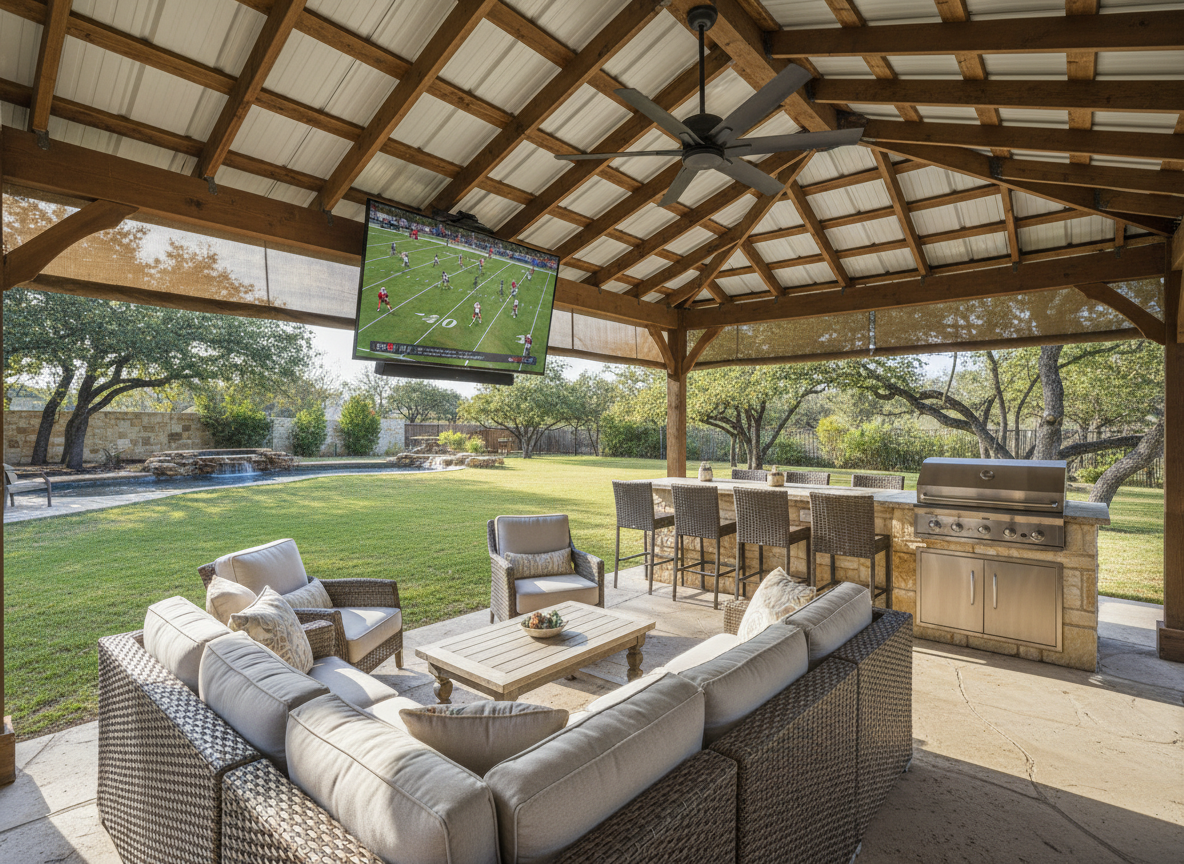
Here’s a pattern anyone who has set up outdoor TVs will recognize. The screen gets mounted on a Sunday morning, it looks fantastic for the night game that week, and then the first 2:30 kickoff rolls around and the picture turns into a gray smear you can barely read the score bug on. The first instinct is to blame the TV and start shopping for a bigger, brighter one.
Hold off. In most backyards, a bad daytime picture is a light-management problem first and a hardware problem second. Fix the environment and you’ll either solve it outright or at least know exactly what kind of TV you actually need.
Washed Out Usually Means Reflected Light, Not Direct Sun
Direct sun on the screen is the obvious culprit, but most covered patios don’t have that problem. What they have is ambient light bouncing into the glass from every bright surface in front of the TV: a white pool deck, light concrete, pale cushions, a stucco wall behind the couch, or just a big open patch of sky.
That reflected light does two things. It puts visible glare on the screen, and it lifts the blacks so the whole image loses contrast. That’s why a daytime picture looks “gray” rather than just dim. Sit in your usual seat with the TV off and look at the black screen like a mirror. Whatever you see in it is what you’re fighting during the game.
Placement Beats Screen Size Every Time
A 65-inch screen in deep shade will look better at 3 p.m. than an 85-inch screen near the edge of the overhang. If you have any choice in the matter, put the TV as far back under the roof as the seating allows and face it away from the brightest part of the yard.
In Texas, that almost always means keeping the screen from facing west. A west-facing setup gets hammered during exactly the hours most college games air, and the sun gets low enough in fall to reach well under a typical patio cover.
Check the Spot at Game Time, Not Install Time
Most mounting mistakes happen because the location gets chosen in the morning. The light at 9 a.m. tells you almost nothing about the light at 4 p.m., and summer sun angles tell you very little about October.
Before you drill, prop the TV (or even a piece of black poster board the same size) where you plan to mount it and look at it during the hours you’ll actually watch. If you can, check it again a few weeks later. The sun drops lower as football season goes on, and a spot that was shaded in early September can catch direct light by November.
Shade the Screen, Not Just the Seating
Patio covers are designed to keep people comfortable, not to keep a screen in shadow. Often the fix is a single targeted barrier on the side the light comes from.
- Exterior solar or roller shades on the sunny side of the patio
- Outdoor curtains you can close for day games and open at night
- A retractable awning to extend the overhang in the afternoon
- Privacy side panels or slatted screens
- Shrubs or trees planted to break up a bright sightline over time
You don’t need to enclose the patio. Blocking the one or two brightest sources of reflected light is usually enough to bring the picture back.
Small Tilt, Big Difference
A few degrees of tilt changes what the screen reflects. If you’re seeing bright sky in the glass, a slight downward tilt can swap that reflection for something darker. A tilting or full-motion mount gives you room to experiment.
Go easy, though. Tilt too far and you start reflecting a light-colored floor instead, and many panels lose contrast and color when viewed from well above or below center.
Mount It Lower Than You Think
Outdoor TVs end up too high all the time: over the fireplace, above the outdoor kitchen, wherever the box happened to be. A high screen forces a steep tilt, picks up more sky reflection and gives everyone a sore neck by halftime. Aim to get the center of the screen as close to seated eye level as the space allows.
Get Off the Movie Settings
Picture modes like Movie, Cinema or Filmmaker are tuned for a dark living room. They hold brightness back on purpose. Outside in daylight, switch to Standard or a brighter daytime mode, turn off any eco or power-saving setting that caps brightness, and disable the ambient light sensor if it’s dimming the picture when it shouldn’t.
Then save a dimmer setting for nights so the screen isn’t glaring at everyone after sunset. It’s worth a quick test before deciding the panel can’t handle the space.
Seating Angle Matters, Too
Some panel types lose a lot of contrast off-axis. If the best seats are 45 degrees to the side because the TV is mounted over a grill instead of across from the couch, the picture will suffer even with zero glare. Arrange the seating first, then mount the screen to face it, not the other way around.
Darken What Surrounds the Screen
A bright white wall around the TV floods your eyes with light, and your eyes adjust to it, which makes the image itself look weaker. A darker surround makes the picture look punchier without changing a single setting.
You don’t have to paint the patio black. A dark backing panel, a stained wood accent wall or a dark cabinet behind the screen does the job.
What an Outdoor TV Actually Buys You
Outdoor-rated TVs are built to handle heat, humidity, dust and bugs, and most are significantly brighter than a typical indoor set. They’re generally sold by how much light they’re meant to handle, usually labeled for full shade, partial sun or full sun. Brightness is measured in nits, and the full-sun models run far brighter than most indoor TVs, with anti-glare coatings to match.
Buy for the spot you actually have. A full-shade model in a sunny location will disappoint you, and a full-sun model in a deep covered patio is money you didn’t need to spend. Even the brightest panel struggles mounted straight into a western sky with no shade, so placement still comes first.
Texas Heat Is Its Own Problem
An indoor TV on a Gulf Coast patio is dealing with August heat, humidity and the occasional wasp nest in the vents. Don’t seal any TV into an unventilated cabinet unless the enclosure is designed for it, and check the operating temperature range in the manual for whatever you own. Heat shortens the life of electronics and can make a screen throttle brightness to protect itself.
The same goes for the gear around it. Streaming sticks, HDMI connections and power strips need protection from heat, moisture and insects, and anything electrical outdoors should be on a GFCI-protected outlet with weather-appropriate covers.
Rule Out Wi-Fi Before You Blame the Screen
If the picture keeps going soft and blocky during the game, that’s often the stream dropping resolution, not the TV. Patios are usually at the ragged edge of the home’s Wi-Fi. Run a speed test from your seat during a busy time of day. A mesh node near the back door or a wired connection to the TV will often fix what looks like a picture problem.
Don’t Forget the Sound
Built-in TV speakers have nothing to bounce off outside. Add pool pumps, ceiling fans, traffic and a crowd of people, and you lose the broadcast entirely. A weather-appropriate soundbar or a pair of outdoor speakers makes a day game far more watchable, even before you fix a thing about the picture.
A Ten-Minute Day-Game Test
- Put on a live game during the brightest part of the afternoon.
- Sit in the seat people actually use.
- With the TV off, note what’s reflecting in the screen.
- Turn it on and block the brightest side with a curtain, umbrella or piece of cardboard.
- If the picture improves dramatically, you have a light problem, not a TV problem.
- Now adjust picture mode, brightness and tilt.
- Only if it’s still unwatchable after all that, start shopping.
When It Really Is Time for a Different TV
If the screen is shaded, the reflections are under control, the settings are right and the picture still fades every afternoon, then the TV simply isn’t bright enough for that location. That’s when a partial-sun or full-sun outdoor model earns its price. The upside of doing it in this order is that you’ll know exactly which category you need.
Set It Up for Day and Night
The best backyard setups aren’t static. During a day game, the shades come down, the picture goes to a bright mode and people sit where the reflections are lowest. At night, open everything back up, drop the brightness and let the string lights do some of the work. Planning for both is easier than trying to find one configuration that’s perfect at every hour.
The Thunderfoot Sports Take
Most backyard TVs that look bad during day games are in the wrong spot, facing the wrong direction or set up for a living room. Control the light, control the reflections and put the screen where people actually sit. Do that before you buy anything, and there’s a good chance the TV you already own will be fine.